
The AI passport: one system prompt that makes any chat answer your way
An AI passport is a short system prompt that describes who you are, how you want answers, what the model must never do and what it should say when it is unsure. You paste it at the start of a chat or into the custom instructions field, so every model begins from the same understanding of you instead of a blank page.
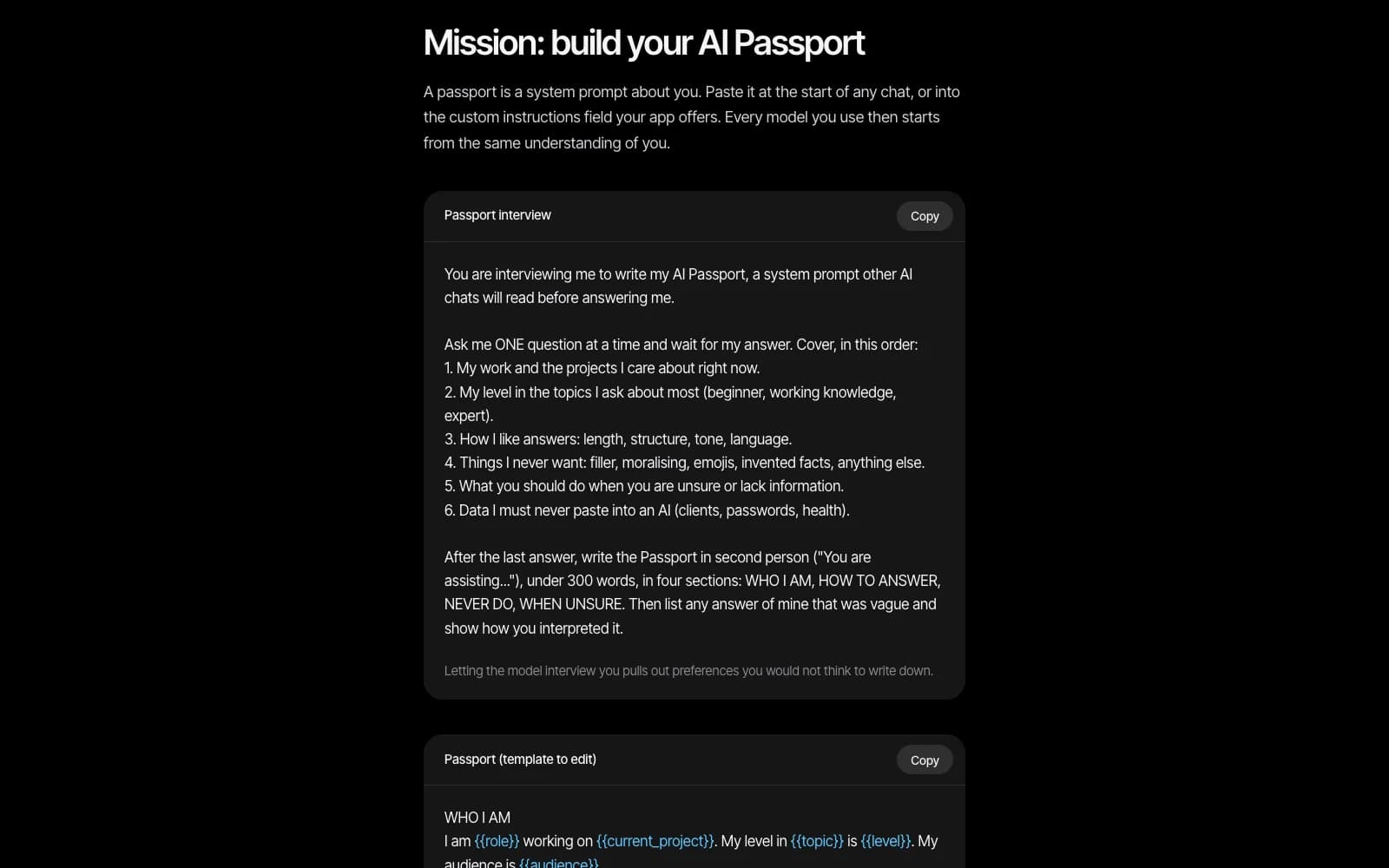
Most people open a chat, type a request and get an answer written for nobody in particular. The fix is not a cleverer question each time. It is one standing document that travels with you. Here is how to write it in about twenty minutes and how to check that it works.
Key ideas
- A model starts every chat blank unless the app adds notes for you.
- A passport has four parts: who I am, how to answer, never do, when unsure.
- Let the model interview you, one question at a time, instead of writing alone.
- Test it on three tasks, one of them a trap, and fix every line that drifts.
Why a blank chat gives generic answers
A language model reads text and predicts what comes next. It has no picture of you unless that picture is inside the text it is reading. Whatever feels like memory is just text placed in front of the conversation, so a fresh chat knows nothing about your job, your level or your taste.
A system prompt is standing text placed before the conversation. It shapes every answer without you repeating yourself. The passport is simply a system prompt written deliberately about one person: you.
The four parts of a passport
The lesson uses four short sections. WHO I AM covers your role, your current project, your level in the topics you ask about and your audience. HOW TO ANSWER sets the order (answer first, reasoning after), the format, the language and the length. NEVER DO lists what you refuse to receive: invented facts, quotes or links, flattery, padding. WHEN UNSURE tells the model to say so, name what it would need to check and label any guess as a guess.
Keep the whole thing under about 300 words. Four small sections are easy for the model to follow and easy for you to edit later. And keep secrets out: describe your role and preferences, never passwords, keys, client names or personal documents, because a passport travels between tools you have not audited.
Let the model interview you
Writing about yourself from scratch is slow, and you will forget the preferences you only notice when they are violated. So reverse the roles. Ask the model to interview you one question at a time: your work, your level, how you like answers, what you never want, what to do when unsure and which data must never be pasted into an AI.
At the end it writes the passport in the second person, in the four sections, and lists every answer of yours that was vague and how it interpreted it. That last list is valuable: it shows exactly where the model is guessing about you.
Test it on three tasks, then fix the drift
Save the passport as a text file called passport-v1, paste it into a new chat and run three tasks. Take a thing you do weekly, such as a summary, then a draft, and then ask a question whose answer you already know. Add a fourth trap if you like: ask for the exact title and page of a book on a very obscure topic. A good passport makes the model say it does not know.
Mark every place the reply ignored a rule. Each miss becomes a sharper line, which you save as version two. Then paste the same passport into a second app and repeat. The free first mission of the course, “How models think: your AI passport”, walks through exactly this, and it is open to everyone on VITON13 SCHOOL.
In everyday language
Think of a new colleague on their first morning. If you hand them a one-page note about how you work, they stop asking basic questions and start doing useful things. A model is that colleague every time you open a chat, and the passport is the note you hand over.
Try it yourself
Run the passport interview in an AI chat and answer each question honestly, one at a time.
Expected result
A passport under 300 words with four sections, saved as passport-v1.txt.
Check your answer: What should the model do when you ask for the title and page number of a book on an obscure topic?
It should say it is not sure, name what it would need to check, and label any guess as a guess instead of inventing a source.
Questions
Do I need a paid plan to use a passport?
No. Any chat that lets you paste a first message works, and many apps also have a custom instructions field. The method is the same in both cases.
Will the model remember the passport tomorrow?
Only if your app stores it in its instructions or project settings. Otherwise paste it at the start of each new chat, which takes two seconds if the file is ready.
Write your passport once, test it on three tasks and keep it in a file. Mission 1 of the AI course, open free on VITON13 SCHOOL, takes you through the whole build and the next twelve missions each end with something that works on your own computer.
Sources and further reading
- VITON13 SCHOOL — Course 01: Artificial Intelligence ↗Sources checked:
- Anthropic — Prompt engineering overview ↗Sources checked:
- Anthropic — Models overview ↗Sources checked: